Camera Systems
Residential Camera Systems
Secure your home with smart, professionally installed camera solutions from Carolina Burglar & Fire Alarm. Serving South Carolina and Georgia since 1974, we offer customizable systems that help you monitor your property and loved ones—anytime, anywhere.
Two Main Camera Options to Fit Your Needs
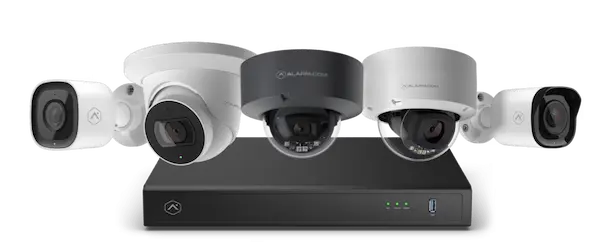 Option 1: Alarm.com Integrated Cameras
- Brand: Alarm.com
- Recording: Continuous live feed with motion-triggered recording rules
- Monthly Fee: $10/month cloud storage
- Access: View footage easily through the Alarm.com app
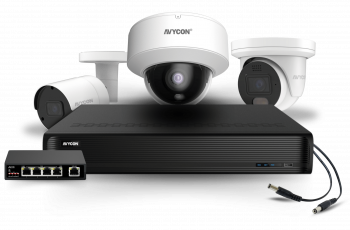 Option 2: Traditional NVR/DVR Systems
- Brand: Avycon
- Recording: Always-on recording locally to NVR/DVR (no monthly fee)
- Monthly Fee: $0
- Access: View on an installed monitor or through the manufacturer’s app
Why Choose These Systems?
- Alarm.com Integrated: Access your cameras, alarms, locks, and lighting from a single app—perfect for smart-home enthusiasts.
- Traditional NVRs: Ideal for homeowners who prefer local storage and no subscription fees.
- Both systems offer HD live video, motion detection, and secure remote viewing.
Choosing the Right Setup for Your Home
We’ll help determine the best solution based on:
- Your preference for cloud vs. local storage
- Desired access features (smartphone integration, two-way audio)
- Number of cameras needed for full property coverage
- Night vision, weather resistance, and optional analytics like people/vehicle detection
Let us walk your property and recommend a system that fits your lifestyle and budget.
Ready to Enhance Your Home Surveillance?
Call (864) 261‑8143 to schedule a free consultation and personalized camera system quote.
Frequently Asked Questions About Residential Camera Systems
Do I need security cameras if I already have a burglar alarm?
Yes. A burglar alarm alerts you when an intrusion is detected, but cameras provide live visuals, recorded evidence, and can help deter crime before it happens. Together, they create a stronger security system.
What is the difference between cloud storage and local storage for security cameras?
Cloud storage saves video footage online, allowing you to access recordings anytime from your phone or computer. Local storage saves footage to an NVR or DVR in your home, usually with no monthly fee.
Can I watch my home security cameras on my phone?
Yes. Both Alarm.com cameras and traditional NVR/DVR systems allow remote viewing. With Alarm.com, everything is managed through their mobile app, while DVR/NVR systems usually include a manufacturer app or web portal.
How many cameras do I need to secure my home?
Most homes need at least 3 to 5 cameras to cover entry doors, the driveway, and main living areas. Larger homes or properties with multiple outdoor spaces may require additional cameras for full coverage.
Do security cameras work at night?
Yes. Modern residential cameras include infrared or low-light technology to record clear footage at night, helping protect your home 24/7.
Will I have to pay a monthly fee for my camera system?
If you choose an Alarm.com camera system, a monthly fee applies for cloud storage and remote features. Traditional DVR/NVR systems usually do not require monthly fees, since storage is local.